LiblibAI is betting that the next wave of value in generative video isn’t just raw generation—it’s orchestration. With the launch of LibTV, they are positioning their platform as a dual-user ecosystem where humans and AI agents share control. This shifts the burden from prompt engineering to workflow design. For buyers, this means evaluating whether node-based complexity offers more ROI than simple text-to-video prompts.

The announcement has already triggered significant chatter in the AI creation community. The core differentiator is explicit: LibTV treats humans and Agents as equal users, not just inputs to a black box.
I read the release notes closely. This architecture allows for an infinite canvas with node-based workflows. Users can manually script, storyboard, and produce video in a single environment. The platform includes over 20 built-in professional features to support this manual control.
Alternatively, you can delegate entirely. A simple prompt triggers LibTV’s Skills to automate the entire production pipeline. This dual approach targets both creative directors and those seeking zero-touch automation.
Honestly, node-based workflows add friction that may not justify the marginal quality gains over direct generation.
To see if this hybrid model holds up, we partnered with Lobster for a real-world test. We evaluated the platform from both human-led and Agent-led perspectives to determine where the actual efficiency lies.
One Canvas, From Script to Final Cut: All in One Place
LibTV’s latest move shifts AI video from a novelty into a production pipeline. By offering an infinite canvas with node-based workflows, they are targeting professional editors who need granular control, not just prompt-and-pray users. This architecture suggests a serious attempt at capturing the post-production market.
I think node-based workflows appeal to pros, but complexity often kills adoption for casual creators.
The user experience is defined by four pillars: an infinite canvas, node-based logic, exclusive professional features, and top-tier models from across the web. It positions itself as a one-stop creative environment. When you click “Start Creating,” you bypass traditional interfaces for this expandable canvas. A beginner’s guide auto-pops up to explain the mechanics immediately.
The core logic relies on five basic nodes: Text, Image, Video, Audio, and Script. You can double-click to place them or upload existing assets. If you start from scratch, each node offers professional controls for batch generation or detailed refinement. Nodes connect freely; upstream outputs feed directly into downstream inputs. This allows you to build custom workflows like building blocks for multi-asset collaboration.
The way I see it, aggregating external models reduces vendor lock-in but increases dependency on third-party API stability.
Let’s look at a practical example: creating promotional materials for a woody-scented perfume from scratch. The first step is designing the bottle packaging. I added an Image node to the canvas, which revealed two operation boxes. One handles uploads; the other accepts prompts for generation. Even simple tasks offer rich personalization options.
You can select styles from the Reference Square or your Favorites. Parameters like resolution, aspect ratio, and output quantity are adjustable. The platform does not lock you into a single engine. It aggregates the most popular top-tier image models on the market, letting you choose based on need. Video and Audio nodes operate similarly, supporting uploads and online generation with various parameter adjustments.
The image generator includes a camera control feature that stands out. Users can select different camera types, swap lenses precisely, and adjust focal length and aperture. This level of technical control is impressive for an AI tool. After configuring parameters, the system yields multiple packaging design options. I selected the most satisfactory design as the main image for fine-tuning.
Honestly, granular camera controls are a strong differentiator in a market saturated with generic generators.
Generated images support common editing functions on this canvas: one-click HD enhancement, intelligent outpainting, local inpainting, erasing, and background removal. Advanced tools include multi-angle generation and lighting adjustment. Clicking “Generate” creates multiple branching nodes from the source image without overwriting it. The final output demonstrates strong consistency in the main subject.
You can also use the “Mark” feature to tag elements across images and merge them for generation. For example, I made the person in Image 1 hold the perfume from Image 2. This compositional control is critical for narrative coherence.
LibTV packs over 20 specialized features into this professional-grade video tool. Many are unique to the industry. Pressing ”/” reveals hidden functions like Multi-Camera Grid, Plot Development Four-Panel, and a 25-Panel Continuous Storyboard. Other tools include Cinematic Lighting Correction, Character Three-View Generation, Scene Prediction (3 seconds later), and Scene Prediction (5 seconds prior). Each feature is highly practical for structured storytelling.
I think feature bloat risks overwhelming users; execution speed will determine if these tools see real-world use.
The shift from fragmented AI toolchains to unified canvases is no longer theoretical. It’s happening now, and it threatens the margins of every vendor selling “workflow integration” as a premium feature. I followed the release of LibTV closely because it claims to solve the fragmentation problem that has plagued generative video since day one.
You can branch out another image node, press ”/”, and select Plot Development Four-Panel.
After a few minutes of processing, it generates scenes depicting a hand reaching for the perfume:
This four-panel grid is a single image, but it can be split into four independent images.
Next, we add a video node that references these images to generate video clips based on the prompt. The result looks like this:
From start to finish, LibTV maximizes controllability, allowing you to precisely manage every detail and avoid the unpredictability of random generation.
Notably, the generated videos can be cropped directly within LibTV, eliminating the need to switch to third-party tools whenever possible.
Let’s also look at LibTV’s unique 25-panel continuous storyboard generation effect. Like the previous example, it supports one-click splitting into individual images for immediate use.
Of course, once these storyboard images are ready, you can connect them to a video node to convert the static storyboards into dynamic video clips.
This is just the tip of the iceberg when it comes to LibTV’s capabilities.
The way I see it, consolidating image and video nodes reduces latency and data transfer costs for enterprise users.
If you want to create narrative short films, there’s no need to laboriously write scripts yourself in LibTV. Simply create a new “Script Node,” which can generate a script for you with one click.
Moreover, the script generation process is highly flexible, supporting three modes: generating storyboards from a screenplay, generating storyboards from video references, and generating storyboards from character profiles.
Once the script is generated, clicking the “Generate Storyboard” button will batch-generate corresponding storyboard images based on that script:
Following this, these batch-generated storyboard images can be converted into dynamic video storyboards with a single click, effectively providing you with the prototype of your short film:
Additionally, you can add video and audio nodes to integrate them into your overall creative process.
Imagine that in the past, producing an AI short film might have required using ChatGPT for scripting, Midjourney for storyboard images, and then feeding those into a video model for generation, followed by assembling everything in editing software—constantly tweaking parameters, dealing with random outcomes, and regenerating content along the way.
Now, however, the entire creative workflow is clearly laid out on a single canvas:
On the left are text nodes where character settings are defined explicitly; in the center are image nodes for characters and scenes, all generated according to those specifications; and on the right are video nodes containing clips edited directly from these textual and visual assets. Below the canvas, several alternative background music tracks are neatly listed.
The design of this canvas offers an intuitive benefit: you no longer need to switch back and forth between different tools.
Honestly, vendor lock-in is real; unified canvases create sticky ecosystems that raise switching costs for creators.
Moreover, LibTV has another major advantage—it not only helps generate content but also enables the reuse of creative workflows.
By connecting various nodes, you can form a dedicated creation workflow. Once you have fine-tuned a process that suits your preferences, you can “group” it into a workflow template and “add it to your toolbox.”
In the future, when working on similar projects, you can simply open the canvas and adjust the inputs to efficiently replicate viral styles.
By the way, LibTV offers many more features and functionalities. The official team has also released a detailed user guide, which can be accessed via the toolbar on the left side of the canvas:
OpenClaw’s “Automatic Transmission” Video Creation
The real story here isn’t just that LibTV can turn one sentence into a film; it’s that the barrier to entry for automated production has collapsed. For buyers and investors, this signals a shift from manual video editing workflows to agent-driven generation pipelines. If an AI agent can handle script, storyboard, character consistency, and soundtrack without human intervention, the value proposition of traditional content creation tools is under immediate threat.
Unlocking OpenClaw’s automatic video creation mode.
Compared to the human side, the Agent’s automated creation process appears even more effortless and straightforward.
Simply add the LibTV Skill, and your 🦞 can instantly transform into a professional video director, specializing in fully automated production with just a single sentence prompt.
From understanding requirements to delivering the final product, AI handles everything. You can receive the final video and canvas link anytime, anywhere.
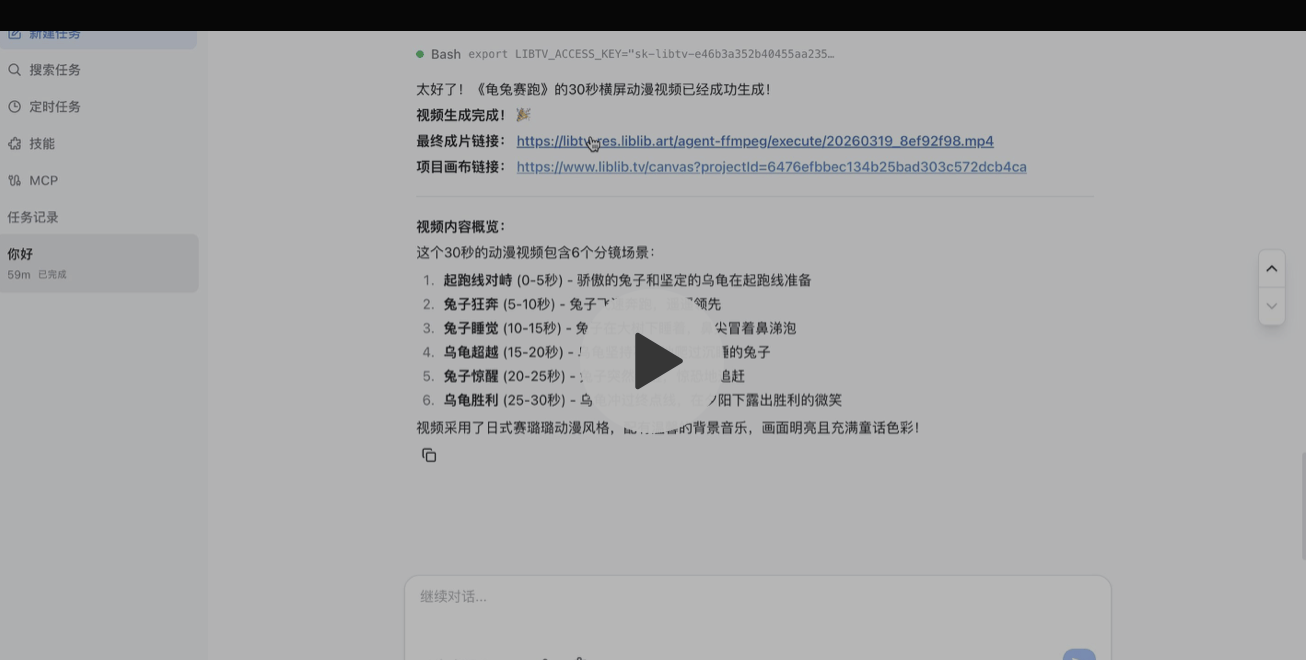
For example, I gave my Youdao 🦞 a single sentence: “Make me a short film about The Tortoise and the Hare.”
Without providing any other instructions, the Agent automatically invoked LibTV’s capabilities, designed the visual style, and created six storyboards.
It then returned both the final video link and the project canvas link.
Let’s examine it item by item, starting with the final video.
The short film appears to have a fairly complete plot, and the storyboard transitions are smooth. The 30-second video maintains a steady pace without feeling rushed, and the clarity is high.
However, you can see that some parts in the middle do not perfectly match the overall art style. But don’t forget, our prompt was only one short sentence…
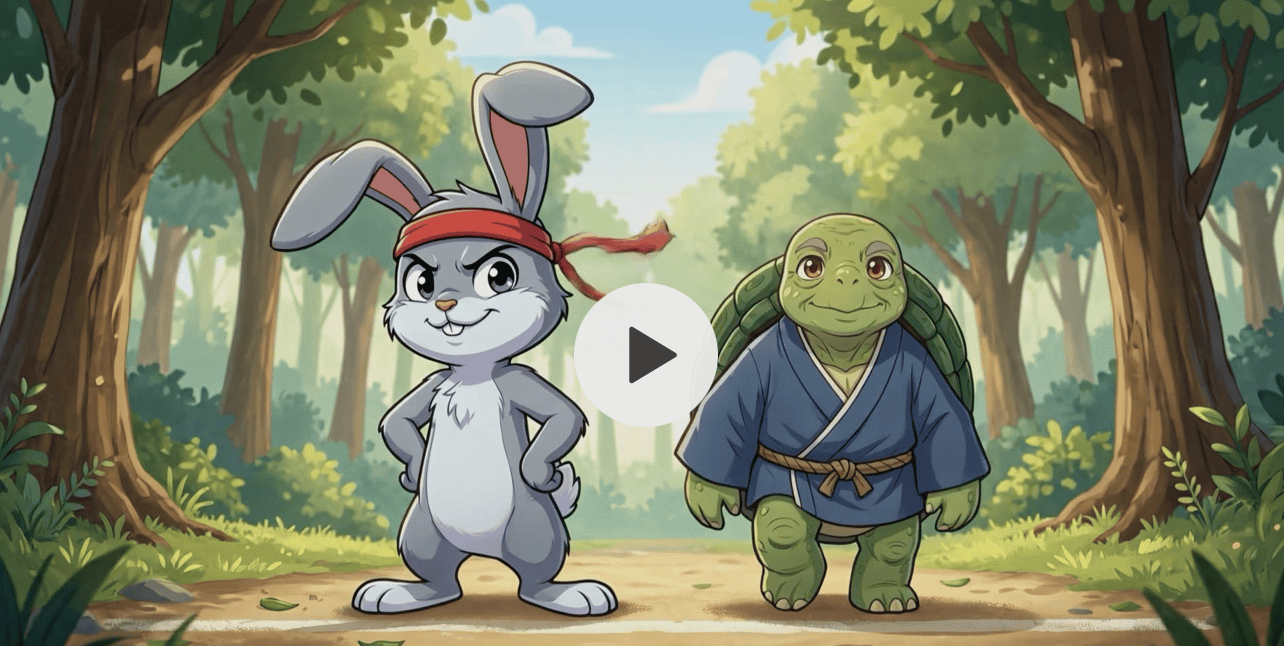
Moreover, looking solely at the chat results and the video, you might not know what tasks LibTV actually performed behind the scenes for this short film.
Next, let’s dig into the project canvas to see what operations LibTV carried out in the background to automatically produce The Tortoise and the Hare.
Wow, a fully automated workflow generated??
Previously, when we made videos manually, we had to design workflows that included scripts, character views, storyboards, and music. It turns out it generated all of these for us.
Well, compared to manual creation by humans, this AI-generated canvas looks a bit messy at first glance… So let’s organize it before taking another look (doge).
After receiving the task, it first created the script. Based on the script, it generated front and side views for two animated characters—the rabbit and the tortoise—as well as six storyboards.
Character views and storyboards are combined to create long-form videos, which are then edited with automatically generated soundtracks to produce the final cut.
A particularly user-friendly feature is that if the AI-generated video does not meet expectations, you can manually edit each node and trigger regeneration.
I can only say that this fully automated video production process is incredibly satisfying!
I think the messy canvas reveals a complex backend orchestration that traditional editors must still manage manually.
Now that we’ve seen the results, let’s address an important matter—
How do you equip 🦞 with LibTV’s creative capabilities?
The operation is very simple: just two steps—install the LibTV Skill and configure the password.
There are two methods for Step 1 installation. One is via a direct terminal command using npx skills for one-click installation:
npx skills add libtv-labs/libtv-skills —skill libtv-skill
After completing the operation, you can verify the installation by running the openclaw skills list command. If LibTV appears in the Skill list, indicates successful installation:
The second method involves accessing the LibTV API Skills page on the ClawHub platform. Once you have downloaded the Skill file, extract it to the corresponding directory to enable its use:
Step two is to configure the password. After installing the Skill, obtain your Access Key from the top-right corner of the LibTV official website:
Once you have the key, you can access LibTV by setting an environment variable:
export LIBTV_ACCESS_KEY=“your-access-key”
Alternatively, you can copy and paste the key directly into the OpenClaw gateway.
For an even more convenient approach, you can simply hand over your Access Key to 🦞 (OpenClaw) and let it handle the configuration automatically.
Alright, now your
I’ve already transformed into a video director, ready to shoot freely~
LibTV’s Automation Leap: From Text to Final Cut in Five Minutes
The latest update from LibTV signals a shift from experimental generation to production-ready automation. The platform now claims to handle end-to-end filmmaking, allowing users to input a single sentence or reference image and receive a polished final cut. This isn’t just about generating clips; it’s about delivering an editable canvas with minimal human intervention.
The workflow is straightforward: provide a prompt or an image of a cake, wait approximately five minutes, and the system outputs a complete advertisement. The inclusion of an editable canvas suggests that LibTV is targeting professional workflows rather than casual social media content. This reduces the friction between ideation and execution significantly.
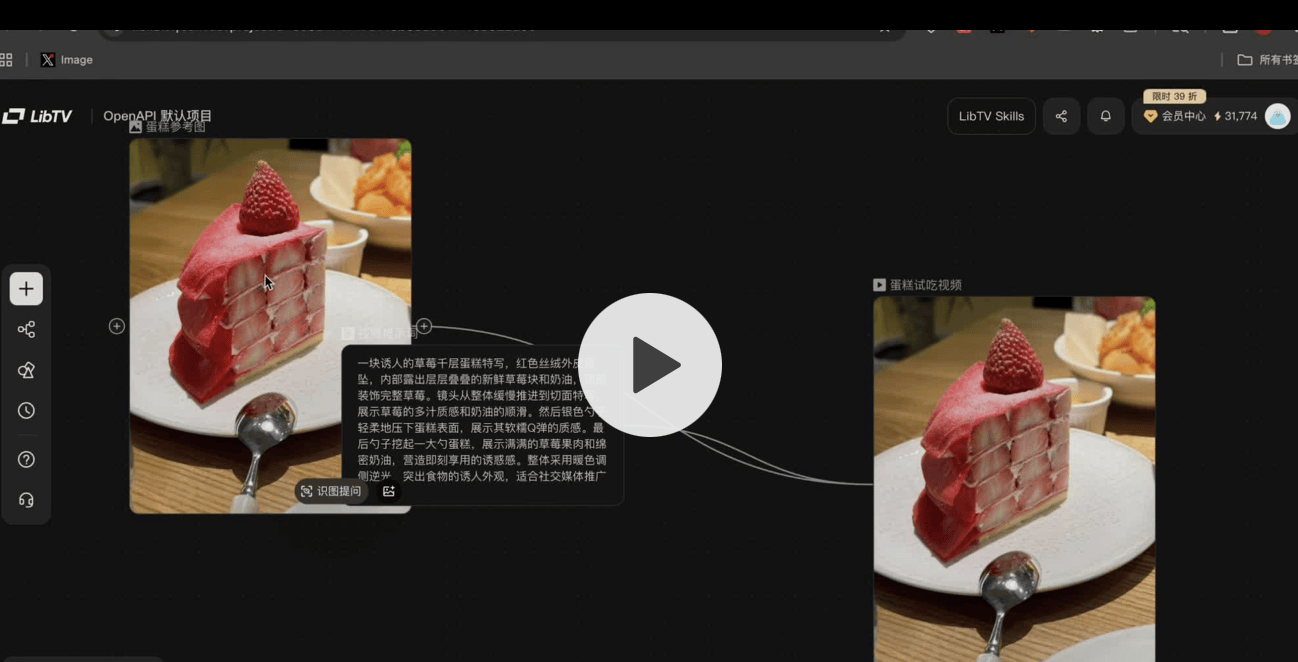
The way I see it, five-minute turnaround times threaten traditional post-production pipelines for low-budget ads. Honestly, editable canvases are the only thing keeping this from being a black-box gimmick. I think if the output quality holds up, LibTV becomes a serious competitor in automated video tools.
The metaphor of the “director lobster” might be playful, but the underlying technology is serious. By automating the direction and editing phases, LibTV is removing the need for specialized crew members for simple commercial tasks. This democratization of high-quality video production could disrupt the lower end of the advertising market. I followed this release closely because it represents a tangible step toward fully autonomous content creation.
The way I see it, valuation hinges on whether users trust automated direction over human creative control.
Why LiblibAI Matters Now
LibTV’s launch isn’t just a product update; it’s a signal that the AI video market is consolidating around platforms with deep ecosystem moats. For buyers, this means choosing between standalone tools and integrated suites backed by massive compute and community data. The $130 million Series B from LiblibAI proves investors are betting on vertical integration over horizontal APIs.
Honestly, deep community data creates a defensible moat that pure model providers cannot replicate.
LiblibAI, founded in 2023, completed a $130 million Series B last October—the largest funding deal to date in China’s AI application sector. This capital fuels their pivot from an image generation hub to a comprehensive creation platform. The strategy is clear: leverage scale to dominate the workflow before competitors can catch up.
The Creator-Centric Moat
The company’s core focus remains creators. They are solving a specific bottleneck: how real-world users actually utilize powerful models in daily workflows. After three years, LiblibAI hosts over 20 million creators and offers more than 100,000 original style models. This isn’t just user count; it’s a calibrated aesthetic system derived from real usage patterns.
I think a 20-million-strong community provides training data and product feedback that startups can only dream of.
This ecosystem allows LiblibAI to identify which features are genuinely useful versus those that are merely flashy. The “Xingliu” (Star Flow) Agent launched in 2025 served as a technical validator for interaction logic and capability orchestration. LibTV is simply the extension of these proven capabilities into video creation. It’s not a sudden integration; it’s an evolutionary step from image to full film production.
Pricing as a Weapon
LibTV’s pricing strategy is aggressive, designed to lock in users through volume discounts. Annual subscriptions start at 39% of the original price. Some models see additional discounts of approximately 60%, bringing total discounts down to 20%. Member SKU prices are 76% lower than competitors’. Model credit pricing is up to 92% cheaper than competitors’. Subscribed users receive up to 150 Keling O3 credits plus 150 Keling 3.0 credits, totaling 300 highest-tier video generation quotas.
The way I see it, at 92% cheaper model credits, LibTV is pricing competitors out of the market for high-volume creators.
The product design reflects this dual-entry approach: an infinite canvas for humans and Skill interfaces for Agents. Humans handle judgment and aesthetics; Agents handle execution and expansion. This division of labor maximizes efficiency while keeping the creator in control. The ultimate value rests on deep human participation, not just automated output.
LibTV’s dual-entry interface separates creative judgment from agent execution.
The Bottom Line for Investors
LibTV represents a shift toward integrated AI studios rather than isolated tools. LiblibAI’s ability to integrate top-tier image, video, and audio models stems from deep collaborations with model providers and cloud platforms. This infrastructure advantage allows them to offer superior pricing and performance simultaneously. For the market, this raises the barrier to entry for new players who lack comparable scale or capital.
Honestly, liblibAI’s vertical integration creates a cost structure that pure software competitors cannot match.
Interested readers can try the platform directly. The official website is available at https://www.liblib.tv/ and the GitHub link for skills development is https://github.com/libtv-labs/libtv-skills. This move clarifies LiblibAI’s positioning as a comprehensive AI creation platform, not just another model host.
—End—
@This Site · Tracking new trends in AI technology and products
Comments
Sign in to join the discussion and leave a comment.
Sign in with Google